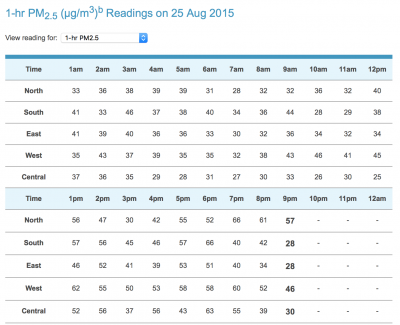
how to compute spot reading for PM2.5 index

it’s common knowledge to go to NEA’s hazeDOTgovDOTsg to obtain the 24-hr and 3-hr average PSI reading (:

but for whatever reason, if you would like to know the past 1-hr reading (aka spot reading) for the PM2.5 index, NEA also provides the data to us. as it is data, you will need to do some quick manual ‘computation’ to turn it into useful information. here’s the steps:

1. visit the Pollutant Concentration page

2. scroll slightly down to find the default 24-hr Sulphur Dioxide readings.

3. click on the dropdown listbox, select 1-hr PM2.5.

4. visit AQI calculator hosted by airnow.gov, and key in the readings from NEA webpage to obtain information about the air quality for the past 1-hr.

5. if you are lazy to go through steps 1-4, you could either visit the AQICN website, or download the Asia Air Quality app in Google Play Store or iOS App Store, OR

6. perform steps 1-3, and remember that any reading above 55Β΅g/m3 is in the Unhealthy range.

Screenshot 2015-08-25 21.40.44

//update 14/9

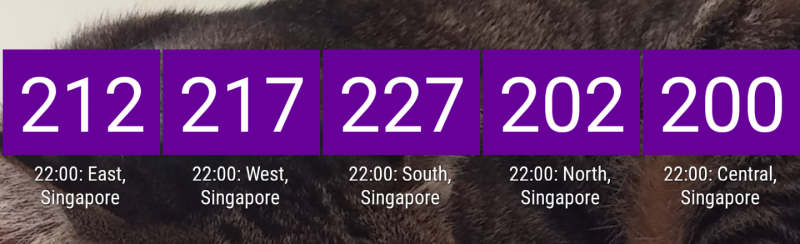
recently i’ve been posting screenshots to fb timeline to update on AQI spot readings. these are but widgets from the asia air quality app (instructions for iOS can be found on aqicn.org)
2015-09-10 14.57.19

//update 25/9
do note that AQI & NEA’s PSI readings may not be equal. AQI shown above takes a direct computation of PM2.5 figures only. PSI on the other hand is a composite figure; the details on how to compute PSI can be found under NEA’s FAQs, or a direct link from here.

//update end
teaching in the 21st century video

this piece of prezi presentation turned up in my fb history this morning. it was an item from my timeline 3 yrs ago. the presentation captured thought leaders’ ideas on what teaching and learning is about in the 21st century classroom:

the ideas are from 2010, and 5 yrs later, how much has our (CL) classroom changed?

thank you fb for having this neat, surprising history feature (:

tool – doctopus

chanced upon this tool via astro pro‘s fb feed. installed as a google sheet add-ons, it’s a very useful admin tool for teachers who are using google docs/drive to assign and monitor students’ work. there are a couple of videos on the official site, here’s one HOWTO video to start with:

tool – nearpod

saw on lookang‘s fb feed yesterday this tool, and meiyin mentioned it to me today. what a coincidence. decided to take a quick look at the tool and examine its functionalities.

Screenshot 2015-08-12 16.05.50

it’s essentially a tool that builds interaction with live audience during a live presentation, somewhat like a PPT+Socrative 2-in-1. offline student-machine ‘interaction’ is available for a paid account that allows students to view prepared contents and answer preset qns (akin traditional e-learning **zzz**); click here for an example.

supports mobile apps on Android, iOS, and Windows phone. these apps would afford a teacher to ‘interact’ with students with access mobile devices w/active internet connections by gathering live feedback throughout the session/class. good for assessment for learning (AfL) (:

when a session goes live, control is only available from the main slide-to-slide view. if a slideshow is embedded as one of the slides, the teacher will have no control over the viewing of that slideshow.

besides pre-prepared content, teachers can also push website URLs, and Open-ended questions to students during a live session (somehow i got an error trying this on my droid).

teachers who would like to co-create presentation can do it through the Share via email function (not tested).

functionalities available to FREE account:
0. easy to navigate interface
1. create slideshow by importing PPTx files, images, PDF, and Google images search and insert directly
2. 50MB total storage & 20MB presentation size
3. export only PDF reports (per session)
4. 30 students per live session limit
5. UNICODE support (good news for CL teachers)

limitation of FREE (aka Sliver) account:
1. image upload size limit: 3MB
2. video upload size limit: 20MB
3. slide content eXcludes webpage, PDFs, live twitter feed, audio files
4. no self-paced homework/presentation mode
5. no CSV reports export, nor per student report
6. no export slides/presentation as PDF

paid account will set one back USD120 (annual billing). did not get to try the homework feature since i did not pay a fee.

to summarise, nearpod is a frontal presentation tool (~PPT) that affords teachers to build in feedback from students (e.g. for the purpose of AfL). students will need internet connected (mobile/laptop) devices to get this going. it may afford CoL where teachers/students may come together to co-create contents (not tested). however, using a free account, users would be limited to mostly static content #ithink (due to file size limit, and no linkage to external websites).

learn what vs. how to learn

during last week’s meeting, some discussions on course offerings for teachers based on what they need took place. having read this article on a History professor reflecting on whether the teaching of history should focus on content (“εŽ†ε²ε­¦δ»€δΉˆ”), or should it be how to learn history (“εŽ†ε²ζ€ŽδΉˆε­¦”), i can’t help but to analyse the discourse through the above lens.

(personally) sadly, the perspective taken still adopted an empty-container-to-be-filled metaphor. for example, if teachers have needs in grammar knowledge, we should conduct course(s) to fill the container(s) with the needed knowledge. there’s no right or wrong since different learning theories may apply, but the perspective taken would affect the way a course is designed. how different would it be if the “enabling teachers on how to learn” perspective is adopted instead?

we always say teachers teach the way they are taught (citation needed), or teachers teach the way they learnt (citation needed). if teachers are not allowed to become self-directed learner, but instead the assumption is empty vessels to be filled, how could s/he teaches his/her students to be a true self-directed, lifelong learner of the 21st century?

in this internet/knowledge age, there’s no lack of contents especially online. but the skill of understanding/applying/synthesising & creating new knowledge based on what turns up from the internet is what our students should be empowered with. but if a teacher does not learn this way, will s/he believe that learning takes place as such, and in turn design his/her learning activities where students learn ‘how-tos’ instead of downloading of (overloaded) data? there’s no lack of literature on how teachers’ beliefs affect his/her teaching.

NE Show (11/7) - fireworks #5
NE Show (11/7) – fireworks #5