buying a new samsung phone?

… go ahead with your purchase if you can accept/swallow the following (no saying it will happen to you, but it happened to me):

1. NO ONE-ONE (1:1) exchange even if your brand new phone gives problem within 1 day

2. Have your phone serviced, and it gives problem again within the day of getting it back

3. take time off your busy schedule to make as many trips as needed to the service centre

4. pay parking fees if you drive and expect no reimbursement (oh btw, LG gives service centre customers parking reimbursement)

my experience in brief: i bought a new Samsung Galaxy Note 3, gives problem within first day, no 1:1 exchange provided. serviced, gives MORE problems within same day. phone back in hospital, and no guarantee the above cycle won’t repeat itself. coming to 2 weeks now not a single day of ‘normal’ usage.

this is the little note that i dropped on Samsung Singapore’s fb page:

on 3 Jan I bought a new set of SGN 3 from Starhub. within a day I began to notice intermittent loss in data network, which is abnormal for a brand new phone. finally found time to send it in on 11 Jan. to my surprise, a big corporation like Samsung doesnt provide a ONE-TO-ONE exchange for a BRAND NEW purchase. and #iwonder WHY!?!

the motherboard was replaced and i got back my phone the same 11 Jan afternoon. within 6 hours, I had 2 problems, data network lost PLUS mobile network loss. am i SO LUCKY or is there seriously something wrong with Samsung’s product QC? 2 continuous breakdowns for 2 supposedly new products (phone & replacement motherboard)?

if Samsung provides a ONE-TO-ONE exchange, i think the problem would have been solved long ago. coming to 2 weeks after making a new purchase, i do not get to use it normally for even a single day. my SGN 3 is currently lying in the ‘hospital’. the management should review this and reflect your feelings on this if you were in a customer’s (or my) shoes.

btw, if i were to learn about the no ONE-TO-ONE exchange policy for BRAND NEW purchase earlier, i would have bought another phone from your rival companies.

would you still buy a Samsung phone? likely yes, but probably the above note will make you pause and think again.

updated on Jan 18, 2014 with Samsung’s response and my reply:

— samsung singapore’s reply on January 16 at 5:54pm —
Hi, we are sorry to hear about your experience. Exchange requests are evaluated on a case by case basis, based on the assessment of your device after repairs. Please kindly furnish us with your service number or leave us your contact number (Desktop: http://spr.ly/6183dC1h or Mobile: http://spr.ly/6184dCG6) so that our Customer Care team can follow up with you. Thank you.

— my update for samsung on Jan 18 4pm —
Thanks Samsung Singapore for the clarification. Fyi, we were told right in the face by the service centre personnel that

“No! We only do servicing here.”
“Is there anyway we can ask for a one-to-one exchange cos we have problem with a new Day 2 product?”
“Samsung doesn’t do one-to-one exchange even if you have problem Day 2.”

So, it’s either the service centre misrepresented Samsung’s stance, or your communication with your service centre has broken down somewhere.

I have gotten back the phone yesterday. And the service centre confirmed the replacement motherboard was also faulty. Two faulty motherboards in a row is real lucky indeed, but I think it also speaks extremely well of Samsung’s product QC. Hopefully this 3rd board holds.

For the matter, will my warranty be extended given the amount of pain and time wasted, not to mention the car parking fees that wasn’t reimbursed in this entire saga? Thank you.

n61 battery flat rescue operation

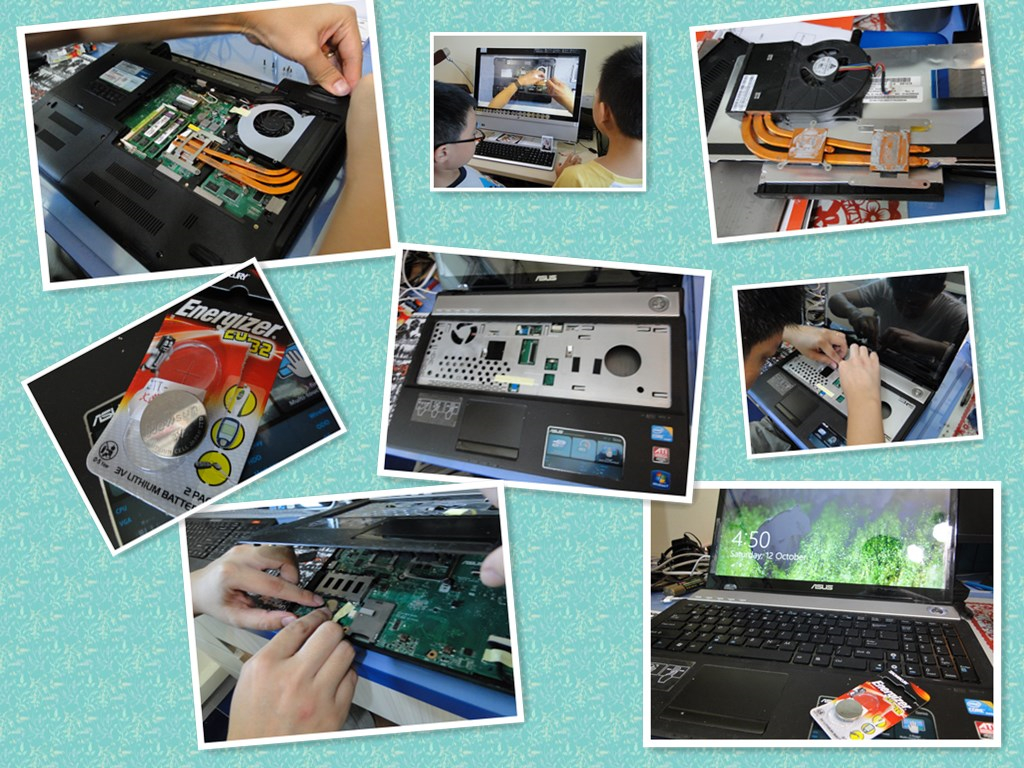
my asus n61jq refused to power up for good yesterday. a symptom prior to this was the laptop was unable to remember the date/time and CMOS settings. based on my experience, i know the cmos battery is getting weak, but it continued to work for a while, and an ntp sync was able to fix the time/date out-of-sync problem. and yesterday, it refused to power up totally. this confirms some notes in the forums that an asus laptop will not power up if the cmos battery is flat.

thanks to youtube, i was able to preview the taking apart of the inner parts, especially locations of the screws and cables. this is the most useful video (though it’s in Russian):

the cmos battery is located next to the touchpad at the lower left corner. so one has to remove almost every screw you can find (counted a total of 4 different types), remove the heat sink, the hard disk, the optical drive, the keyboard, 4 ribbon cables before you can access it.

about 30 mins or so, the dismantling, replacement, and reassembling were completed. the CR2032 cmos battery lithium cell was replaced. and the laptop is now working again! *BIG SMILE*

131012-ASUS N61 rescue

new char siew menu for new season

Week Menu
I Char Siew Noodle
II Char Siew Rice
III Char Siew Kway Teow
IV Char Siew Spaghetti
V Char Siew Chop
VI Char Siew Rojak
VII Char Siew Mee Sua
VIII Char Siew Sandwich
IX Char Siew Curry
X Char Siew Prata
XI Char Siew Cutlet
XII Char Siew and …..Char Siew! (aka double-shot Char Siew)

dedicated to my good bro and myself (:

MessageMe SMS spam

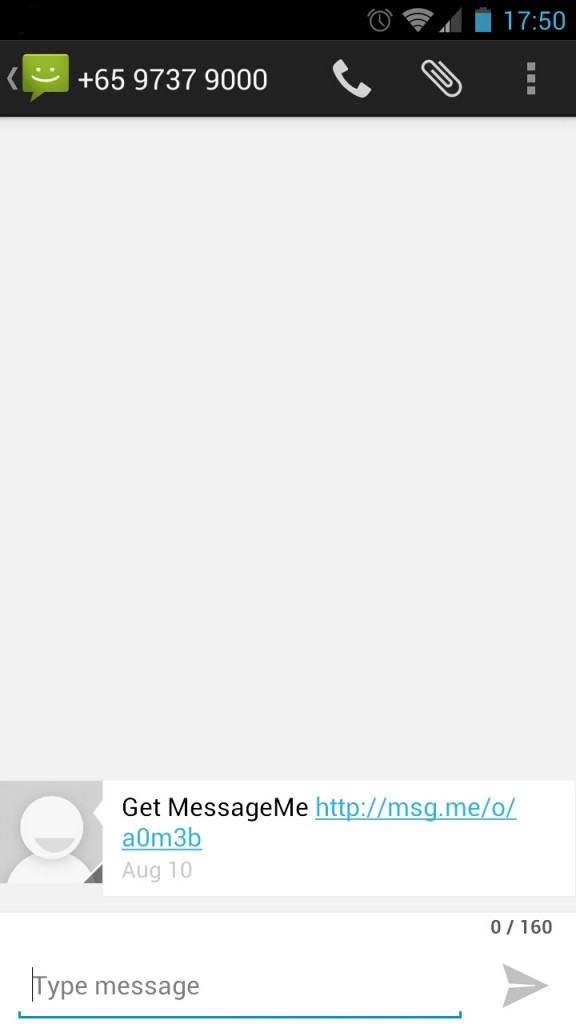
there’s a round of spam (herein defined as copies of unsolicited messages that are delivered through electronic means) SMS on-going to get pple to install the Message Me app that reads something like:

“Get MessageMe (followed by a http colon slash slash msg dot me slash something something)”

messageme-spam

and there’s a fb status warning pple of its “severity” being shared:

“If u received SMS fm MessageMe, don’t click the link. Ignore & delete. It’s a spam virus going around. Once u click the link , the same SMS wil be sent out to ALL the contacts in your hp. And max out your SMS quota.text from Members”

out of curiosity and to be extra cautious, I checked out the URL with a browser running linux. the URL behaves like a redirect URL that leads you to d/l the app.

the origin of the SMS I’ve received two days ago is unknown. but the ‘severity’ may not as serious as the fb status that’s going around, cos like some forumers were saying, if the redirect URL can steal and max out your SMS quota, there exists a SERIOUS vulnerability in BOTH iOS and Android. chances of this is extremely extremely slim.

so what you could do is this:
(1) don’t support MessageMe for it’s spamming attempt (and other apps who do the same in future);
(2) ignore/delete the SMS, and beware of similar SMSes in future cos we won’t know one day a vulnerability could exists on more than one OSes at the same time and be exploited by crackers out there (:

—-
p.s. Thanks to Vincent for pointing out this possibility:

would it be possible that the URL will detect the OS and redirect to a different URL? E.g. it detects that the browser is calling the URL from a Android phone and redirect to a APK, which would usually prompt the user to confirm installing the app. If the user confirms, the newly installed app could possibly read the phone contacts and spam out SMSes.

i agreed to this possibility and i thought this is a cleverer way to spam. but i still maintain that by clicking on the link itself (without installing the app) and SMSes will be sent out points to a severe vulnerability in both iOS and Android; such a case is extremely unlikely here.

—-
pps. on further thought, if one’s contact list contains 2000 phone numbers, there is a chance of ‘maxing out’ one’s sms quota indeed if all 2000 phone numbers become recipients of the spam :O is the app kind enough to stop at a maximum cap (but will the phone know what’s your free SMS quota?), or will it just send out the maximum possible number of contacts in the phone? scary thought if one does not have unlimited SMSes and one’s no. of contacts exceeds one’s free SMS quota in a month :O